• Door naar de hoofd inhoud
Assessio_Bloom-Long_Black_225x60px
  • Home
  • English
  • Release notes
  • Contact
  • Home
  • English
  • Release notes
  • Contact

Update

April 2025

2 april 2025

For English, see below.

  • Toegankelijkheid: een kleine cosmetische verandering
  • Assessment-tab eerst
  • Publieke link voor je assessments
  • Melding voor kandidaten bij hergebruik testresultaten

Toegankelijkheid: een kleine cosmetische aanpassing

Een klein verschil, maar wat vriendelijker voor de ogen. We hebben de meldingen in onze applicatie aangepast zodat deze beter zichtbaar zijn op niet witte achtergronden. 

Binnen onze Recruitmentoplossing

Navigatie: Assessment tab eerst

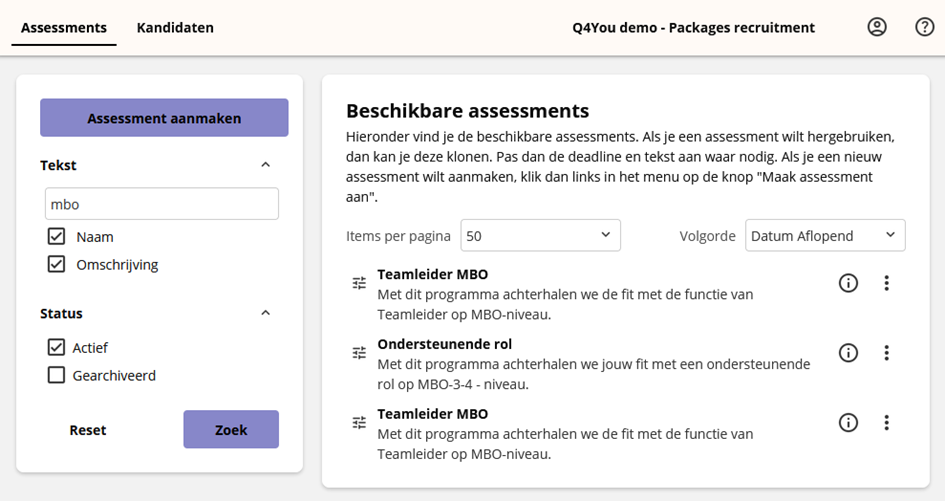
We streven er steeds naar om het gemak voor de gebruiker te vergroten en het aantal kliks te verminderen. De snelste route om een kandidaat aan te maken en een assessment klaar te zetten, is vanuit het assessment. Daarom zetten we voortaan de lijst met assessments vooraan en de lijst met kandidaten als tweede. 

Als je dus inlogt bij onze recruitmentoplossing, dan kom je als eerste in het assessmentoverzicht terecht. Door op een assessment te klikken kom je direct bij de kandidaten voor dat assessment terecht. Dit zorgt voor meer overzicht en minder klikken bij veelgebruikte handelingen die met een assessment te maken hebben.

Met deze wijzigingen werk je efficiënter en sneller. Wil je werken met het overzicht van alle  kandidaten? Klik dan op de tab Kandidaten.
Steeds weer makkelijker: een publieke link voor je assessments

Goed nieuws voor recruitmentteams! In deze update introduceren we voor assessments een openbare link waar kandidaten zich kunnen aanmelden voor assessments. Dit betekent minder handmatige invoer en een soepelere aanmelding voor kandidaten.

Zo werkt het:

  • Je laat het systeem een unieke link voor een assessment maken. Deze kun je delen via een e-mail, of zelfs direct plaatsen op de vacaturepagina op de website van jouw organisatie.
  • Een kandidaat klikt op de link en voert een e-mailadres in.
  • Op basis van het e-mailadres maken we automatisch een account voor de kandidaat aan, koppelen we deze aan een het betreffende assessment en sturen we een activatiemail naar de kandidaat.
  • De kandidaat start direct het assessment vanuit de activatiemail.

Deze aanpak versnelt het wervingsproces: je hoeft geen accounts voor kandidaten aan te maken en zo wordt de kans op fouten maken kleiner. 

Zo maak je een link:
 

  1. Navigeer in het assessmentoverzicht naar een assessment waar je een publieke link voor wilt maken en klik op de i. Dit opent het informatiescherm van het assessment. 
  2. Onder de knop Nieuwe kandidaat aanmaken zie je een knop Openbare link.
  3. Klik daar op Inschakelen en dan kun je naar wens de link kopiëren. 

Kan de vacature gesloten worden? Navigeer weer naar dit venster en klik dan op Uitschakelen. De link zal dan geen toegang meer geven tot het assessment.

Nieuwe melding voor kandidaten bij hergebruik testresultaten

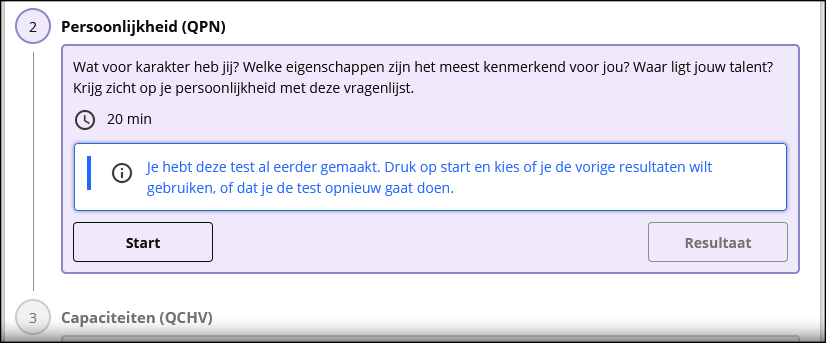
In de update van juni vorig jaar hadden we er al melding van gemaakt: kandidaten die al eerder een assessment gemaakt hebben kunnen eerdere resultaten hergebruiken. De kandidaat krijgen bij het starten van de test van ons een melding dat er eerdere resultaten zijn. 

Van klanten kregen we feedback dat voor kandidaten het niet altijd helder was om welke test of vragenlijst het dan ging. Dat was nog niet zichtbaar bij de assessmentstappen.

Dat vonden wij ook een prettige toevoeging, en daarom hebben we vanaf deze update specifiek aan die stappen een melding toegevoegd. Zo kunnen kandidaten direct zien, waar er eerdere resultaten zijn die voor hun assessment hergebruikt kunnen worden.
ENGLISH

  • Accessibility: a small cosmetic change
  • Assessment tab first
  • Public link for your assessments
  • Notification for candidates when reusing test results

Accessibility: a small cosmetic change

A small difference, but a friendlier to the eyes. We have adjusted the notifications in our application so that they stand out more on non-white backgrounds.

Within our recruitment solution

Assessment tab first

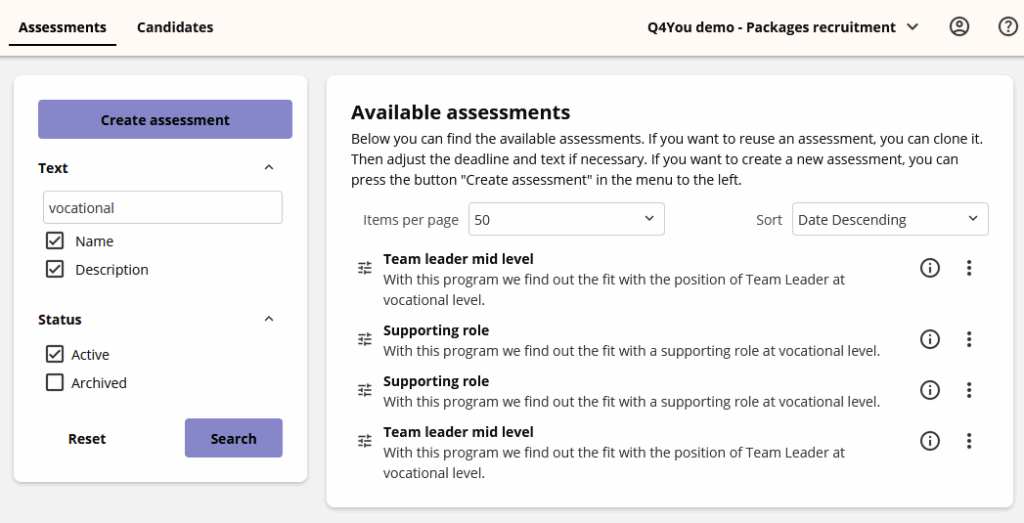
We always strive to increase the user convenience and reduce the number of clicks. The fastest route to create a candidate and prepare an assessment is from the assessment. That is why we now put the list of assessments at the front and the list of candidates second.

So when you log in to our recruitment solution, you will first end up in the assessment overview. By clicking on an assessment, you will immediately end up with the candidates for that assessment. This provides a better overview and fewer clicks for frequently used actions that have to do with an assessment.

With these changes, you will work more efficiently and faster. Do you want to work with the overview of all candidates? Then click on the Candidates tab.
Easier every time: a public link for your assessments

Good news for recruitment teams! In this update, we are introducing an automatic candidate link at assessment level. This means less manual input and a smoother registration for candidates. 

How it works

  • You let the system create a unique link for an assessment. You can share this via email, or even place it directly on the vacancy page on your organisation’s website. 
  • A candidate clicks on the link and enters an email address. 
  • Based on the email address, we automatically create an account for the candidate, link it to the relevant assessment and send an activation email to the candidate.
  • The candidate starts the assessment directly from the activation email. 

This approach speeds up the recruitment process: you do not have to create accounts for candidates and the chance of making mistakes is reduced. 

How to create a link 

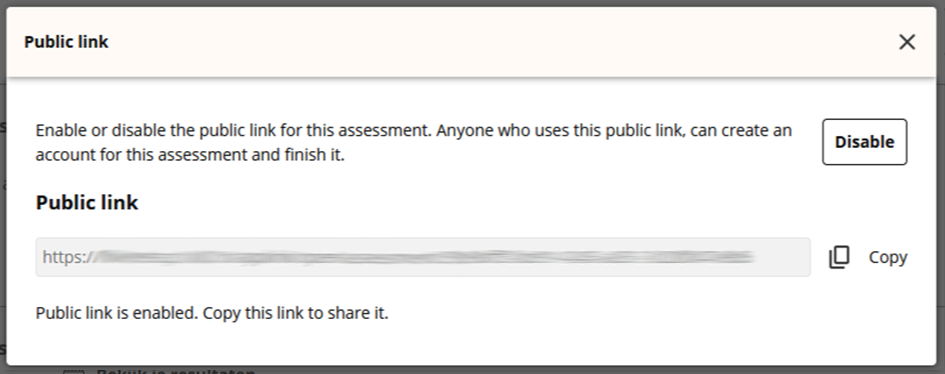
  1. Navigate to an assessment in the assessment overview for which you want to create a public link, and click on the i. This opens the information screen of the assessment. 
  2. Under the Create new candidate button you will see a Public link button. 
  3. Click on Enable there and then you can copy the link as desired. 

Can the vacancy be closed? Navigate to this window again and then click on Disable. The link will no longer give access to the assessment.
New notification for candidates when reusing test results

We already mentioned this in the newsletter of June last year: candidates who had already completed an assessment can reuse previous results. When starting the test, the candidate will receive a notification from us that there are previous results.

We received feedback from customers within our that it was not always clear to candidates which test or questionnaire this reusing of result applied to. This was not yet visible in the assessment steps.

We also found this to be a nice addition, and that is why we have added a notification specifically to these steps from this update. This way, candidates can immediately see where there are previous results that can be reused for their assessment.

Categorie: Update

Maart 2025

6 maart 2025

For English, see below.

Nieuwe teamrapportages

We introduceren vernieuwde teamrapportages! Deze rapportages volgen de vertrouwde stijl van onze andere rapportages, maar bieden nog meer diepgaande inzichten in de samenstelling en dynamiek van je teams.

Wat betekent dit voor jou?
Met deze nieuwe rapportages krijg je beter zicht op hoe je teams functioneren en waar kansen voor ontwikkeling liggen.

De oude rapportages worden stap voor stap vervangen. Benieuwd hoe de nieuwe rapportages jouw organisatie kunnen helpen? Neem contact op met je vaste contactpersoon!

Zelf assessments of tests resetten

Soms loopt een test vast of wil je een kandidaat om een goede reden een nieuwe kans geven. Goed nieuws: dat kun je vanaf nu eenvoudig zelf regelen!

Zo werkt het:

  1. Ga naar de kandidaat en klik op de drie puntjes > Wijzig dossier.
  2. Klik op het assessmentprogramma.
  3. Zoek de service of het onderdeel dat je wilt resetten en klik op de drie puntjes > Reset.

Dit verwijdert de eerdere afname en zet het onderdeel opnieuw open. Let op: resetten is niet meer mogelijk als de kandidaat het assessment definitief heeft ingediend.

Verbeterde datavalidatie voor extra security

We hebben onze datavalidatie geüpdatet om te voldoen aan de nieuwste beveiligingsstandaarden. Dit betekent dat bepaalde speciale tekens voortaan niet meer toegestaan zijn in bijvoorbeeld namen of e-mailadressen.

Waarom is dit belangrijk?
Door deze update verbeteren we de veiligheid van het platform en beschermen we de gegevens van jou en je kandidaten nog beter.

Binnen onze Recruitmentoplossing

Nieuwe optie: e-mailnotificatie bij indienen kandidaat uitschakelen

In de recruitmentoplossing ontvang je standaard een e-mail zodra een kandidaat zijn of haar resultaten indient. We kregen signalen dat dit niet voor iedereen wenselijk is.

Daarom kun je deze e-mailnotificatie voortaan per assessment uitschakelen. Bij het aanmaken van een assessment kun je met een simpel vinkje bepalen of je wel of geen notificatie wilt ontvangen.

ENGLISH

New Team Reports

We are excited to introduce our new team reports! These reports follow the familiar style of our existing reports but offer even deeper insights into your team’s composition and dynamics.

What does this mean for you?
With these new reports, you’ll gain a clearer view of how your teams are performing and where development opportunities lie.

The old reports will gradually be replaced. Curious to see how these new reports can benefit your organisation? Contact your regular account manager for more information.

Easily Reset Assessments or Tests Yourself

Sometimes a candidate starts a test, but something goes wrong – or you simply want to give them a fresh attempt. Good news: you can now reset assessments and tests yourself!

How it works:

  1. Go to the candidate’s file and click on the three dots > Edit file.
  2. Click on the assessment programme.
  3. Find the service or section you want to reset and click the three dots > Reset.

This removes the previous attempt and reopens the section for the candidate. Please note: resetting is no longer possible once the candidate has officially submitted the assessment.

Improved Data Validation for Enhanced Security

We have updated the way we validate data entered into the platform, such as names, email addresses and other text fields. This update ensures we comply with the latest security standards.

What does this mean for you?
Certain special characters will no longer be accepted in these fields. This small change helps us keep the platform secure and protect your data, as well as your candidates’ data.

Within our Recruitment Solution

New Option: Disable Email Notifications When Candidates Submit Results

In the recruitment solution, all users currently receive an email when a candidate submits their results. We understand this isn’t always desirable.

That’s why we’ve added a new option: you can now disable this email notification per assessment. When creating an assessment, simply tick a box to choose whether or not you want to receive these notifications.

Categorie: Update

Februari 2025

5 februari 2025

For English, see below.

Maak eenvoudig meerdere kandidaataccounts tegelijk aan in onze recruitmentoplossing

We hebben het aanmaken van meerdere kandidaatsaccounts in onze recruitmentoplossing vereenvoudigd. Je hebt geen importbestand meer nodig om e-mailadressen in te voeren. In plaats daarvan kun je nu eenvoudig e-mailadressen kopiëren en plakken in onze applicatie.

Ga naar het kandidaatsoverzicht van een assessment om deze functie te gebruiken. Klik daar op de knop “Maak een nieuwe kandidaat aan” en navigeer naar het tabblad “Meerdere nieuwe kandidaten”.

In het tekstveld voer je meerdere e-mailadressen in, waarbij elk adres op een nieuwe regel moet staan. Je kunt e-mailadressen eenvoudig kopiëren en plakken vanuit Excel of een andere lijst.

Let op:

  • Deze functie is alleen beschikbaar vanuit een assessmentoverzicht. Zo worden nieuwe kandidaten direct gekoppeld aan het juiste assessment.
  • Als een e-mailadres al in het systeem staat, kun je kiezen hoe je dit wilt verwerken. Je hoeft dus zelf geen dubbele accounts te controleren!
  • De bestaande manieren om accounts aan te maken blijven gewoon beschikbaar

ENGLISH

Easily create multiple candidate accounts at once in our recruitment solution

We have made it easier to create multiple candidate accounts in our recruitment solution. You no longer need an import file to enter email addresses—now, you can simply copy and paste addresses directly into our application.

To use this feature, go to the candidate overview of an assessment. Click on “Add a candidate” and navigate to the “Multiple new candidates” tab.

In the text field, enter multiple email addresses, making sure to place each address on a new line. You can easily copy and paste email addresses from Excel or any other list.

Key points:

  • This feature is only available from an assessment overview, ensuring that new candidates are automatically linked to that assessment.
  • If an email address is already in the system, you will have options to decide how to process it—no need to manually check for duplicates!
  • Existing methods for creating accounts will remain available.

Categorie: Update

December 2024

19 december 2024

For English, see below.

  • Herinneringen sturen vanuit het systeem
  • Nieuwe looks in onze Bloom-gestileerde omgevingen
  • Meertaligheid is nu echt meertalig
  • Maak meer mogelijk met teams in jouw organisatie
  • Ronde hoekjes voor meer gebruikersvriendelijkheid

Herinneringen sturen vanuit het systeem

Stel je wilt één of meerdere kandidaten een herinnering sturen, of een bericht. Voor klanten die werken met grote groepen kandidaten is soms belangrijk. Daarom hebben we hiervoor functionaliteit ontwikkeld.

Vanuit een assessment of programma vink je de kandidaten aan die je een bericht wilt sturen. Klik op Geavanceerd en in het volgende scherm op Verstuur herinnering. Daar kun je in het tekstveld je bericht personaliseren.

Deze functionaliteit hebben we vanaf deze release beschikbaar gemaakt voor onze recruitmentoplossing. Binnenkort maken we aanpassingen ook beschikbaar voor de overige implementaties. Ook voor het importeren van kandidaten met een lijst e-mailadressen hebben we onze functionaliteit uitgebreid. Je kunt nu de mail aanpassen voordat deze wordt verstuurd.

Nieuwe looks in onze Bloom-gestileerde omgevingen

We kregen feedback van klanten die gebruik maken van  onze Bloom-huisstijl.

We leren hier graag van, en hebben onze kleurstelling nu aangepast. Zo is de kleur van menubalk een stuk zachter geworden, en voeren we een kleur in voor de knoppen en scorecomponenten die er meer uitspringt.

Maak je gebruik van een portaal die de kleurstelling heeft van je eigen organisatie, dan zal er voor jou niets veranderen.

Meertaligheid is nu echt meertalig

We hebben ons meertalige systeem aangepast, zodat je nu de namen van andere talen ziet in het Nederlands als je een Nederlandse gebruiker bent, en in het Engels als je een Engelse gebruiker bent.

Hebben gebruikers of kandidaten per ongeluk de verkeerde taal geselecteerd bij hun eerste keer inloggen? Dan kunnen ze zelf bij de accountinstellingen de eigen taal aanpassen.

Maak meer mogelijk met teams in jouw organisatie

Het is nu makkelijker dan ooit om teams samen te stellen en te beheren binnen jouw organisatie. Wist je dat je al teams kunt aanmaken vanuit het kandidaatsoverzicht?

Maak eenvoudig een team aan, bijvoorbeeld voor een afdeling, projectgroep of een team van beschikbaar talent. Wijs een teamleider aan en voeg teamleden toe om direct overzicht te creëren. Met één klik heb je alle teams van je organisatie onder handbereik en kun je gedetailleerde teamanalyses uitvoeren.

Een belangrijke verbetering in deze update is de nieuwe knop “Iedereen zonder team”. Met deze functie zie je in één oogopslag welke collega’s nog niet aan een team zijn toegewezen. Zo werk je eenvoudig je teams bij en zorg je ervoor dat niemand wordt gemist.

Ronde hoekjes voor meer gebruikersvriendelijkheid

Misschien heb je het al opgemerkt in de afbeelding hierboven: onze gebruikersinterface heeft een subtiele maar doordachte make-over gekregen. Vanaf deze update hebben we de scherpe hoeken in onze elementen vervangen door ronde hoeken.

Waarom deze verandering? Ronde vormen worden door onze ogen als natuurlijker en prettiger ervaren. Het lijkt een kleine aanpassing, maar het draagt bij aan een gebruikservaring die zachter en visueel comfortabeler aanvoelt. Samen met de aangepaste kleurstelling van de update van twee weken geleden willen we je een nog aangenamere en uitnodigende interface bieden.

ENGLISH

  • Send reminders from the system
  • New looks in our Bloom-styled environments
  • Multilingualism is now truly multilingual
  • Make more possible with teams in your organization
  • Rounded corners for more user-friendliness

Send reminders from the system

Suppose you want to send one or more candidates a reminder or a message. For clients who work with large groups of candidates, this is sometimes important.
That is why we have developed functionality for this.

From an assessment or program, you check the candidates you want to send a message to. Click on Advanced and in the next screen on Send reminder. There you can personalize your message in the text field. We have made this functionality available for our recruitment solution from this release.

We will soon make adjustments and introduce this to other implementations.
We have also expanded our functionality for importing candidates with a list of email addresses. You can now adjust the email before it is sent.

New looks in our Bloom-styled environments

We received feedback from customers who use our Bloom house style.
We are happy to learn from this and have now adjusted our colour scheme. For example, the colour of the menu bar has become a lot softer, and we are introducing a colour for the buttons and score components that stands out more.

If you use a portal that has the colour scheme of your own organization, nothing will change for you.

Multilingual is now truly multilingual

We have adjusted our multilingual system so that you can now see the names of other languages ​​in Dutch if you are a Dutch user, and in English if you are an English user.

Did users or candidates accidentally select the wrong language on their first login? They can change their own language in the account settings.

Make more possible with teams in your organization

It is now easier than ever to create and manage teams in your organisation. Did you know that you can already create teams from the candidate overview?

Simply create a team, for example for a department, project group or a team of available talent. Assign a team leader and add team members to create an instant overview. With one click, you have all your organisation’s teams at your fingertips and can perform detailed team analyses.

An important improvement in this update is the new ‘Everyone without a team’ button. With this feature, you can see at a glance which colleagues are not yet assigned to a team. This way, you easily update your teams and make sure no one is missed.

Rounded corners for more user-friendliness

You may have already noticed it in the image above: our user interface has received a subtle makeover. As of this update, we have replaced the sharp corners in our elements with rounded corners.

Why this change? Round shapes are perceived as more natural and pleasing by our eyes. It seems like a small adjustment, but it contributes to a user experience that feels softer and more visually comfortable. Together with the updated colour scheme from the update a fortnight ago, we want to offer you an even more pleasant and inviting interface.

Categorie: Update

November 2024

7 november 2024

For English, see below.

  • Het wachtwoordoogje nu ook bij het loginscherm
  • Actie uitvoeren heet vanaf nu Geavanceerd
  • Optionele e-mail naar kandidaat bij het koppelen van een programma/assessment

Het wachtwoordoogje nu ook bij het loginscherm

Je was er al bekend mee bij het aanpassen van je wachtwoord: het icoontje van een oog in het tekstveld “Nieuw wachtwoord”. We hadden het daar geïntroduceerd om je wachtwoord even zichtbaar maken en controleren of je misschien een typefout hebt gemaakt bij je nieuwe wachtwoord. We kregen van een aantal gebruikers te horen dat ze dit toch ook graag bij het loginscherm zouden willen hebben.

Daarom hebben we vanaf deze update hebben we nu ook het oogicoontje beschikbaar gemaakt bij het inlogscherm van platform. Als je een wachtwoord hebt ingevoerd en je klikt op het oogje en houdt de muisknop ingedrukt, dan kun je het wachtwoord even zichtbaar maken en controleren of je misschien een typefout hebt gemaakt.

De knop Actie uitvoeren heet vanaf nu Geavanceerd

De knop “Actie uitvoeren” in het kandidatenoverzicht hebben we hernoemd naar “Geavanceerd”. Met de feedback die we via onze support kregen, denken we dat deze term duidelijker aansluit bij de typen acties die je daarmee kan uitvoeren. De schermen daarachter hebben we bijbehorende verwoordingen gegeven die daarbij aansluiten. De functionaliteiten die je gewend was daar te vinden blijven ongewijzigd.

Bij het koppelen van een programma/assessment een optionele e-mail naar kandidaat

Als je nu een assessment/programma koppelt aan een kandidaat, dan zul we je daarna de optie geven om de kandidaat direct op de hoogte te stellen via e-mail. Handig voor jou, maar ook de kandidaat is direct op de hoogte.

Staat het vinkje aan, dan sturen we bij het opslaan van de koppeling gelijk een e-mail naar de kandidaat. En in de e-mail geven we instructies mee hoe de kandidaat in kan loggen en gelijk makkelijk kan deelnemen.

Wil je de kandidaat (nog) niet op de hoogte stellen, zorg er dan voor dat het vinkje uit staat, en we sturen het mailtje niet.

ENGLISH

  • The password eye now also on the login screen
  • The button Perform an action is now named Advanced
  • When linking a program/assessment, send an optional email to the candidate 

The password eye now also on the login screen

You were already familiar with it when changing your password: the icon of an eye in the text field “New password”. We introduced it there to make your password visible and check whether you might have made a typing error with your new password. We heard from a number of users that they would also like to have this on the login screen.

That is why we have now also made the eye icon available on the platform login screen from this update. If you have entered a password and click on the eye and hold your mouse button down, you can make the password visible and check whether you might have made a typing error.

This way we hope to make logging in easier.

The button Perform an action is now named Advanced

We have renamed the “Perform action” button in the candidate overview to “Advanced”. Based on the feedback we received from our users, we believe that this term is more in line with the types of actions you can perform with it, and this will make it a lot clearer. We have given the screens behind it corresponding wording that matches this. The functionalities that you were used to finding there remain unchanged.

When linking a program/assessment, send an optional email to the candidate

If you now link an assessment/program to a candidate, we will give you the option to inform the candidate directly by email. Convenient for you, and the candidate is also informed immediately.

If the checkbox is checked, we will immediately send an email to the candidate when saving the link. And in the email we provide instructions on how candidates can log in, so they can easily participate.

If you wish to not inform the candidate (yet), make sure that the checkbox is unchecked, and we will not send the email

Categorie: Update

Oktober/October 2024

3 oktober 2024

For English, see below.

Exporteren van factureerbare activiteiten

Vanaf nu kun je alle factureerbare activiteiten eenvoudig exporteren vanuit het portaal. Deze nieuwe functie biedt een overzichtelijk rapport van alle gestarte sessies, zonder dat je onnodige gegevens hoeft weg te filteren.
 
1. Klik op het raam icoontje, rechtsboven in.

2. Geef vervolgens een datumbereik op
3. Klik op export

Let op: Om deze functie als consultant te gebruiken, heb je specifieke rechten nodig. Ben je functioneel beheerder of verantwoordelijk voor facturatie en wil je gebruikmaken van deze nieuwe funcite? Neem dan contact op met Assessio Bloom Support via support.nl@assessiobloom.com of +31(0) 88 100 47 77

We hopen dat deze nieuwe features jouw werkproces zullen versnellen en verbeteren!

ENGLISH

Export of Billable Activities

Starting now, you can easily export all billable activities directly from the portal. This new feature provides a clear and concise overview of all initiated sessions, without the extra information you previously had to filter out.

1. Click the window icon, at the top right

2. Enter a date range
3. Press Export

Please note: To use this feature as a consultant, specific rights are required. Are you a functional manager or responsible for invoicing and want to use this option as a consultant?

Please contact Assessio Bloom Support via support.nl@assessiobloom.com. or +31(0) 88 100 47 77 We hope these new features will streamline and enhance your workflow!

Categorie: Update

  • Pagina 1
  • Pagina 2
  • Pagina 3
  • Interim pagina's zijn weggelaten …
  • Pagina 5
  • Ga naar Volgende pagina »

Wil je oefenen?

Kijk dan eens op oefenassessment.nl

Contact

  • 088 – 100 47 77
  • support.nl@assessiobloom.com

Adres

Bezoekadres Hoofdkantoor
Cruquiusweg 111-F
1019 AG AMSTERDAM

Meer over Assessio Bloom

Kijk ook eens op onze website assessiobloom.com

Op onze website maken wij, en derde partijen, gebruik van cookies. Dit, om de diverse functionaliteiten op deze website mogelijk te maken en om inzicht te verkrijgen in het bezoekersgedrag op onze website. Ga je ermee akkoord dat er cookies worden geplaatst zoals omschreven in onze Privacy- en cookieverklaring. Als je hiermee niet akkoord gaat, dan kunnen delen van de website anders werken.